Backup
To get started with backing up data for IBM DevOps Solution Workbench you need to first understand where data created and used by IBM DevOps Solution Workbench is stored. The following graphic provides a high level overview of the components of IBM DevOps Solution Workbench.
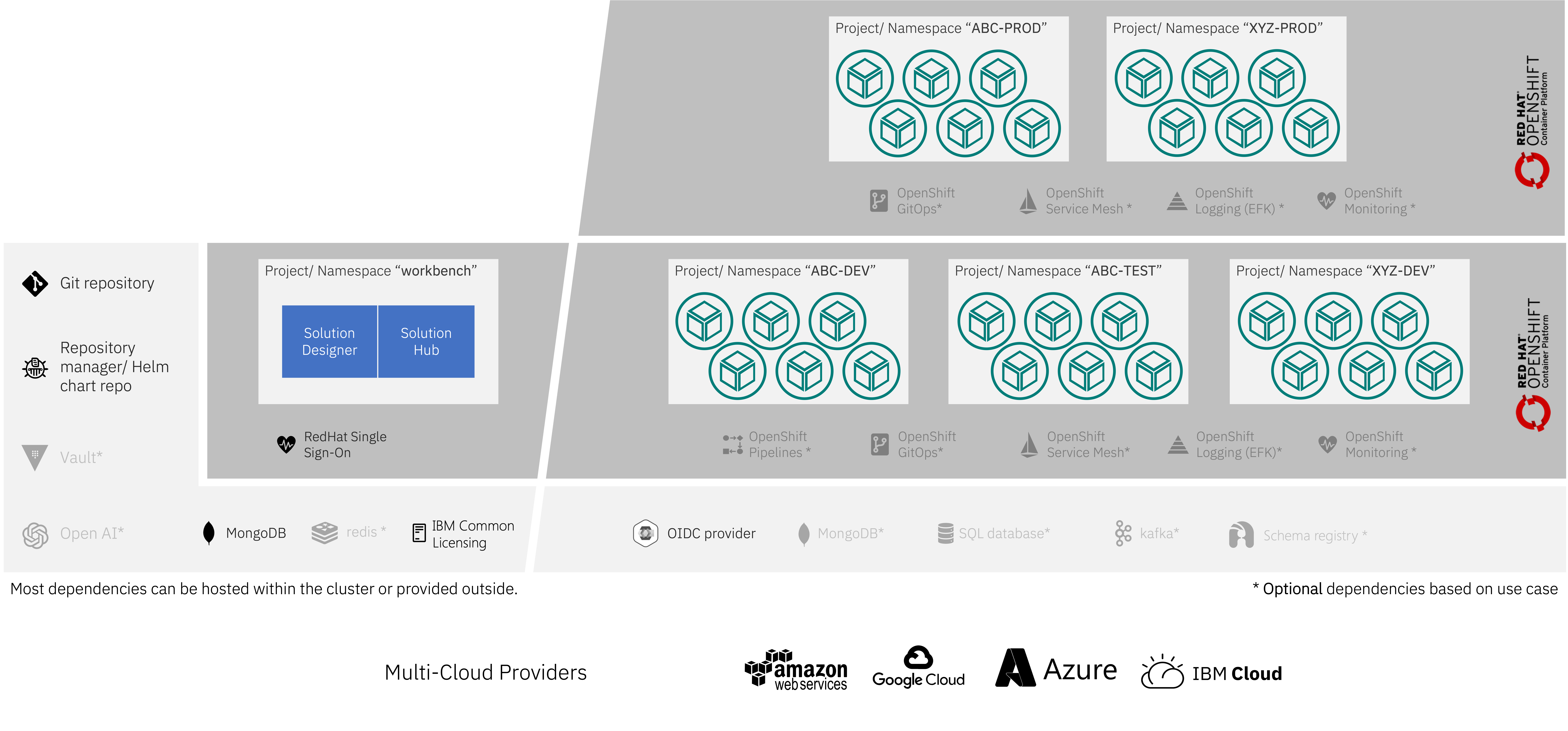
What you should immediately see is that various components making up IBM DevOps Solution Workbench are deployed to different OpenShift projects (e.g. "DEV") and make use of different services that are not part of the product, i.e. mongoDB, kafka, a Git repository. The components can coarsely be grouped into two functional groups that can be thought of as components providing design-time and run-time functionality respectively that have different backup requirements.
Design time: where design-time data lives, how it relates to Git, the designer’s database, baseline and OML profile administration, and how to back up Git, the workbench database, Kubernetes resources, and Keycloak is documented in Backup and restore.
Run Time Data
Document Data - MongoDB
Solutions developed with Solution Designer are eventually deployed to provide business value. During execution of these
services, data will be created and stored. By default, this data is stored in a MongoDB. This data will in general be
the most critical data as it is the business data that your enterprise depends upon. Backing up this data is therefore
essential. IBM DevOps Solution Workbench doesn't bring this MongoDB instance but relies on you providing the connection data to a
MongoDB at installation time. You can find the configured connection data for the MongoDB by obtaining the value of
the k5-default-document-storage-service-binding secret in the OpenShift project that serves as the deployment target
for the solutions you develop (there can be more than one of those for different stages of development, testing, staging
and production)
oc -n <deployment project> get secret k5-default-document-storage-service-binding -o jsonpath='{.data.binding}'|base64 -d;echo
The MongoDB connection configuration can be overridden per solution or per deployment target (OpenShift project). So be aware that there might be multiple instances to back up.
Event Data - Kafka
Asynchronous communication and messaging of solutions uses kafka as the message transport. Kafka is again a service that is not an integral part of IBM DevOps Solution Workbench but a service you need to (optionally) provide for the solutions you develop. The messages or events that are exchanged via kafka can also contain business data and depending on your use case might be as critical as the business data stored in MongoDB. Specific recommendations on how to back up kafka are beyond the scope of this document and the necessity to have regular backups of the data in kafka depends on your use case and whether you have activated kafka for your solutions or not. Backing up streaming data systems like kafka is non-trivial and recommended best practices vastly depend on your use case. There are many discussions in the community about this. See e.g. Comparing Kafka Backup Solutions
General OpenShift/kubernetes backup concepts
In addition to the business and design-time data, an installation of IBM DevOps Solution Workbench comprises of a number of kubernetes resources that are stored in the kubernetes etcd database. These resources contain a multitude of data relevant to your installation of the product and should also be considered when planning for a backup strategy. It is recommended using the OADP Operator to help with backing up kubernetes resources. This operator helps to define backup configurations, backup locations and backup schedules that can back up resource data as well as persistent volume data to various (Cloud) object stores. If you run stateful services like MongoDB on your cluster and use cluster storage services supported by OADP and Velero - like OpenShift Container Storage , Portworx and similar products or the block-storage services of cloud providers like Amazon, Microsoft or Google, you can use OADP to create backups containing everything IBM DevOps Solution Workbench comprises of in a convenient way. Configuration and usage of these tools is dependent on your particular setup and storage technology and therefore out of scope of this document.
Conclusion
IBM DevOps Solution Workbench does not store business data but instead relies on storage services provided to the installation by the customer. Backing up data created through usage of the product is therefore highly dependent on the particular setup you have chosen. Hopefully this overview has given you some insight on what data is stored where and which are the most crucial data to consider for a backup strategy as well as providing some pointers to useful tools to assist you in these endeavors.